

Introduction:
By using five flex sensors and microcontroller we have designed a smart glove which convert American sign language alphabets into text format. The text is displayed on an android mobile screen with the help of Bluetooth module.
Components required:
- Flex sensor(2.2 inch)
- Bluetooth module HC-05
- Arduino nano
Components description:
Flex sensor

A flex sensor is a type of sensor that gauges how much deflection or, alternatively, bending has occurred. The flex sensor is a two-terminal device. It has no polarized terminals, such as capacitors or diodes. Therefore there aren’t any positive or negative terminals. This sensor needs 3.3V to 5V DC to activate. Materials like plastic and carbon can be used to build this sensor. The sensor’s resistance will alter when the plastic strip holding the carbon surface is turned aside. It is also known as a bend sensor. According to their size, these sensors can be divided into two categories: 2.2-inch flex sensors and 4.5-inch flex sensors. Except for the operating principle, these sensors’ size and resistance are different. 2.2-inch flex sensors were employed in this study. Applications for this kind of sensor include computer interface, rehabilitation, servo motor control, security systems, music interface, intensity control, and anywhere the user wants to adjust the resistance while bending.
Bluetooth module HC-05

The HC-05 Bluetooth Module is made for setting up transparent wireless serial connections. It communicates using serial transmission, which makes interacting with a controller or PC . The HC-05 has two operating modes: AT Command mode, where default device settings can be altered, and Data mode, where it can send and receive data from other Bluetooth devices. Using the key pin, we can control the gadget in either of these two modes.
Arduino nano

The smallest and most traditional breadboard-friendly Arduino board is called the Nano. The Arduino Nano has a Mini-B USB connector and pin headers that make it simple to link it to a breadboard.
Working:
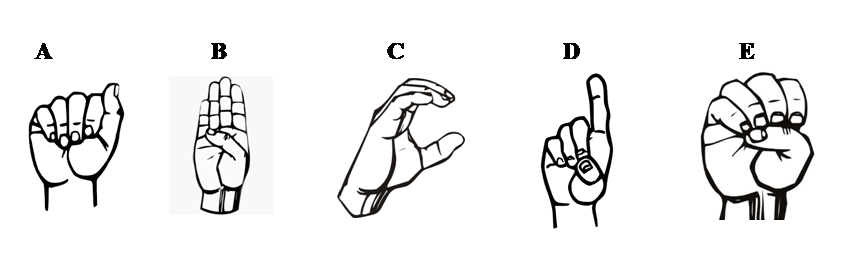
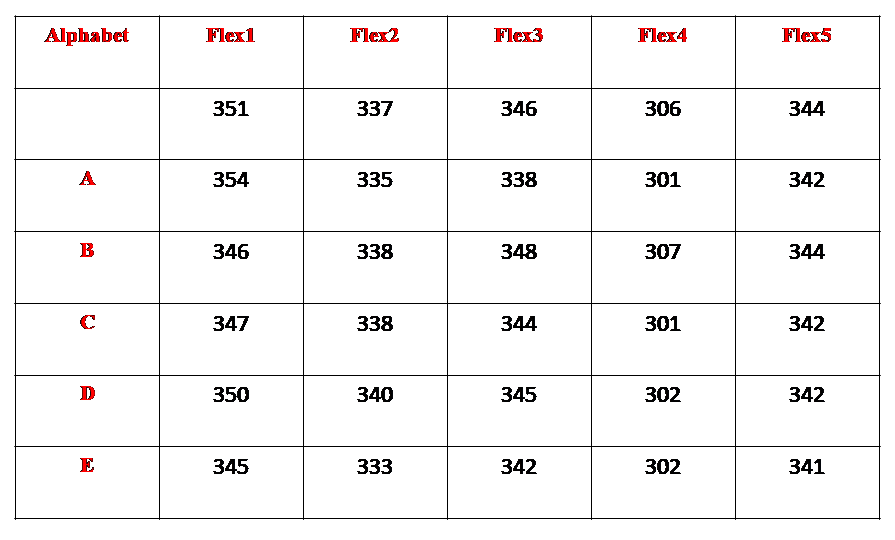
The hardware setup is done according to the circuit diagram. Bluetooth app is installed in android mobile and paired with the project. According to American sign language, each gesture is made with the help of right hand fingers and sensor values are noted down from serial monitor. Then these calibrated values are used in code with proper condition. The project is powered by a 5 volt dc adaptor with current rating 2 Ampere
American sign language:
Calibration table:
Circuit Diagram:

Designer:
Er. Anil Kumar Prusty
WhatsApp: +91 9861004895
Code for microcontroller:
// Interfacing flex sensor and HC-05 with arduino nano
#include <SoftwareSerial.h>
SoftwareSerial BT(2, 3); // (Rx, Tx)

// Pin definitions for flex sensors
int flexPin1 = A0; // Thumb
int flexPin2 = A1; // Index finger
int flexPin3 = A2; // Middle finger
int flexPin4 = A3; // Ring finger
int flexPin5 = A4; // Pinky

char Letter = ' ';
void setup() {
Serial.begin(9600);
BT.begin(9600);
}
void loop() {
 int flexVal1;
 int flexVal2;
 int flexVal3;
 int flexVal4;
 int flexVal5;
 flexVal1=analogRead(flexPin1);
 flexVal2=analogRead(flexPin2);
 flexVal3=analogRead(flexPin3);
 flexVal4=analogRead(flexPin4);
 flexVal5=analogRead(flexPin5);
 Serial.print("Flex1 = ");Serial.print(flexVal1);
 Serial.print(",Flex2 = ");Serial.print(flexVal2);
 Serial.print(",Flex3 = ");Serial.print(flexVal3);
 Serial.print(",Flex4 = ");Serial.print(flexVal4);
 Serial.print(",Flex5 = ");Serial.println(flexVal5);
 delay(1000);
 //Condition for A
 if((flexVal1 > 350)&&(flexVal2 < 340)&&(flexVal3 < 343)&&(flexVal4 < 306)&&(flexVal5 < 347))
 {Serial.print("Letter = A");
 BT.print(Letter = 'A');
 BT.print(";"); //Indicates end
 delay(2000);}

  //Condition for B
 if((flexVal1 < 347)&&(flexVal2 < 339)&&(flexVal3 > 347)&&(flexVal4 < 309)&&(flexVal5 > 342))
 {Serial.print("Letter = B");
 BT.print(Letter ='B');
 BT.print(";"); //Indicates end
 delay(2000);}

  //Condition for C
 if((flexVal1 < 348)&&(flexVal2 < 340)&&(flexVal3 > 342)&&(flexVal4 < 303)&&(flexVal5 > 340))
 {Serial.print("Letter = C");
 BT.print(Letter ='C');
 BT.print(";"); //Indicates end
 delay(2000);}

  //Condition for D
 if((flexVal1 > 348)&&(flexVal2 > 338)&&(flexVal3 > 343)&&(flexVal4 > 300)&&(flexVal5 < 344))
 {Serial.print("Letter = D");
 BT.print(Letter ='D');
 BT.print(";"); //Indicates end
 delay(2000);}

 //Condition for E
 if((flexVal1 < 347)&&(flexVal2 < 335)&&(flexVal3 > 340)&&(flexVal4 > 300)&&(flexVal5 < 343))
 {Serial.print("Letter = E");
 BT.print(Letter ='E');
 BT.print(";"); //Indicates end
 delay(2000);}

}